Import Deals from CSV
Import Deals from CSV
Section titled “Import Deals from CSV”Use Import deals when you want to create many deals at once.
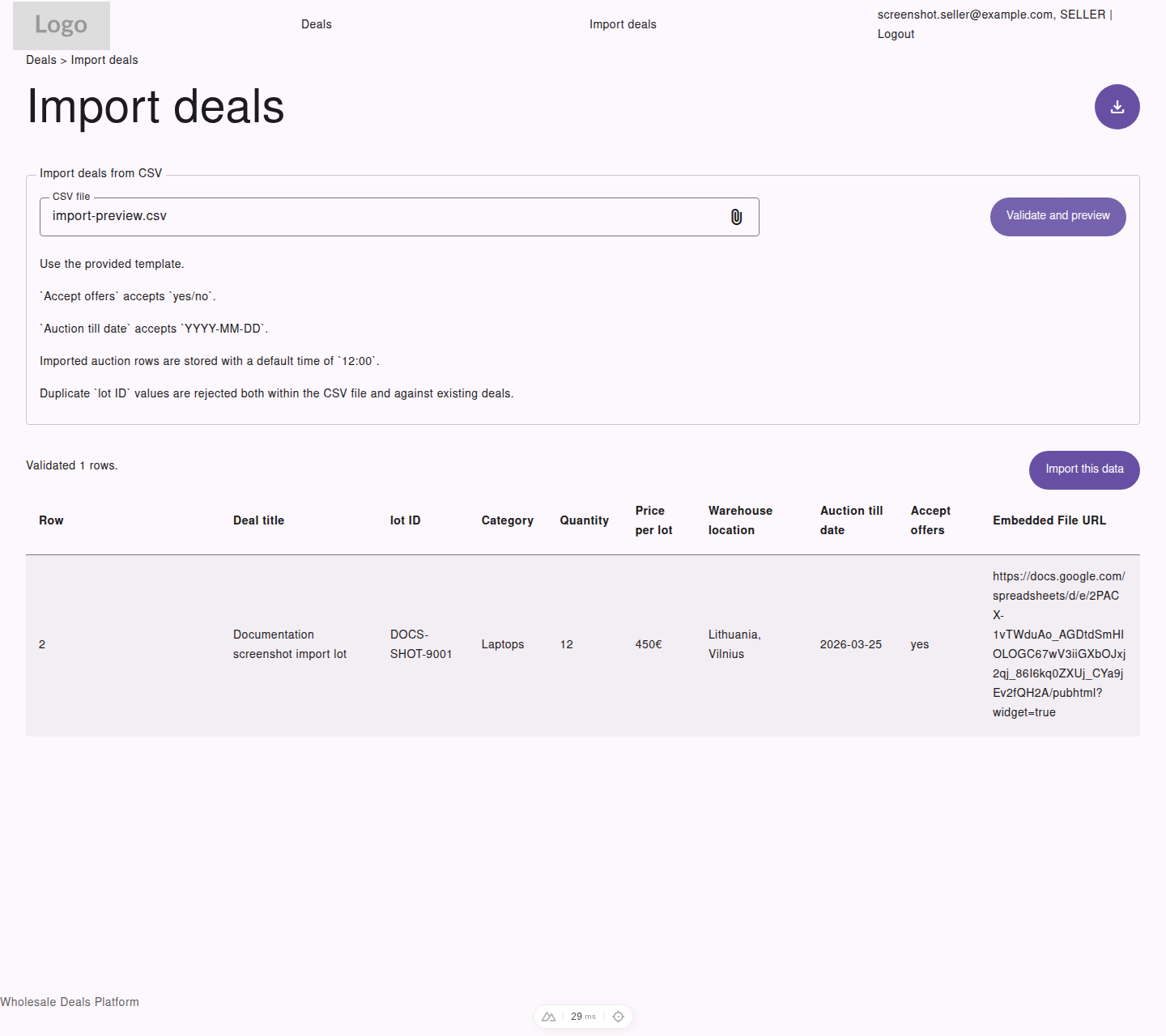
After validation, the import page shows a preview table so the seller can confirm row data before importing.
Recommended Import Process
Section titled “Recommended Import Process”- Open
Import deals - Download the CSV template
- Fill in your deal data using the required columns
- Upload the file
- Select
Validate and preview - Review the preview table
- Select
Import this data
Required CSV Columns
Section titled “Required CSV Columns”The import template uses these headers:
Deal titlelot IDCategoryQuantityPrice per lotWarehouse locationAuction till dateAccept offersEmbedded File URL
Import Rules
Section titled “Import Rules”- use the provided template
Accept offersmust useyesornoAuction till datemust useYYYY-MM-DD- imported auction rows are stored with a default time of
12:00 - duplicate
lot IDvalues are rejected - duplicates are checked both inside the CSV file and against existing deals in the platform
Preview Before Import
Section titled “Preview Before Import”The platform validates the file before saving anything. Use the preview to confirm:
- row values are correct
- dates look right
- prices and quantities match the source data
- embedded file links are the intended ones
Success Result
Section titled “Success Result”After a successful import, the platform confirms how many deals were imported.